New — install on iPhone & Android, with push notifications

Bookings & rostering for your venue

Customers book and pay on your website. Sessions land on your calendar. The right staff get rostered, clock in, and pay works itself out. One system, end to end — or start with just one side.

Start Free Trial
Take bookings online Roster your team
14-day free trial. No credit card required.

How it works

Two sides of your venue, one system — start with either.

Bookings

From your website to a full calendar

1

Customers book & pay on your site

Beautiful booking pages on your own website — card, Apple Pay and Google Pay, gift vouchers and promo codes. No commissions, no customer fees.

2

Sessions land on your calendar

Confirmations and reminders send themselves. Customers can reschedule within your rules, and add-ons and second-experience deals sell themselves along the way.

3

Staffing is one click away

Booked sessions land right beside your roster — assign trained, available staff in a click, staff get notified instantly, and hours flow into timesheets and pay.

Rostering

From availability to published roster

1

Staff set availability

Your team marks when they can work from their phone — with notes, time windows and monthly locking when you need certainty.

2

Generate a fair roster

The engine balances hours across your team in seconds — respecting availability, training and the targets you set. Compare versions and pick the best.

3

Publish & get on with it

One click notifies everyone on Slack or by push. Swaps and claims handle themselves with your approval — and hours flow straight into timesheets and payroll.

Everything you need to run your venue

Bookings, payments, rostering, timesheets, reviews, rewards, and more — built for escape rooms, activity centres, cafes, and any session-based venue.

AutoRoster Generation

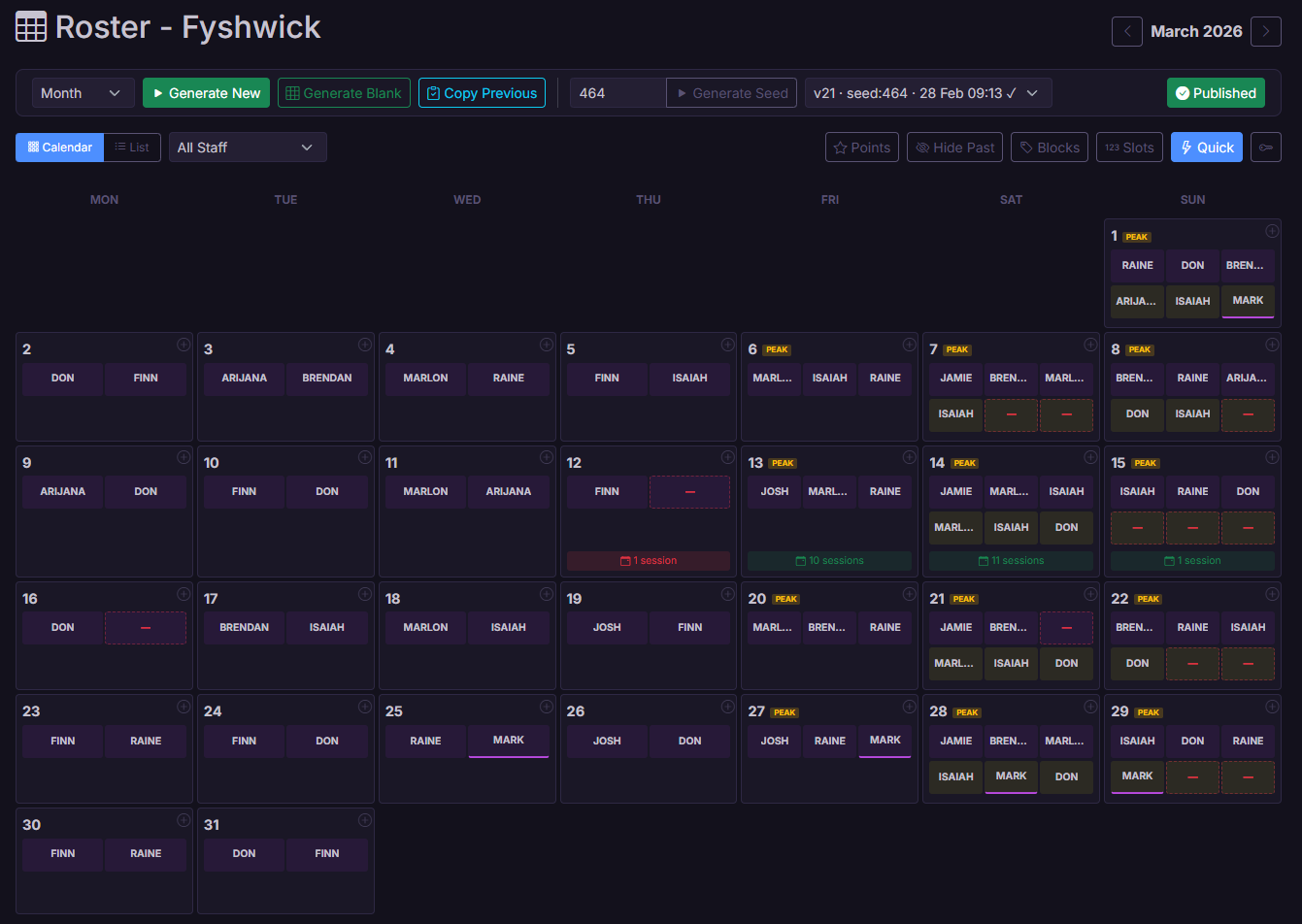
Generate a fair, balanced roster with one click. Same inputs always produce the same result — no surprises.

Deterministic roster generation using seeded RNG. Fairness ratio (current_points / target_points) ensures balanced distribution. Configurable slot weights, day multipliers, and per-staff modifiers.

Booking

Booking Pages & Payments

Customers book and pay on your own website — card, Apple Pay and Google Pay. No commissions, no per-customer fees, and every booking lands straight on your calendar.

Customisable public booking pages and an embeddable widget for your own site. Square-powered payments with wallets, deposits, split deposits and payment links. Live availability with holds, cutoffs and flexible session times. Bookings flow directly into sessions and staffing.

Mobile App & Notifications

Install AutoRoster on any phone — iPhone or Android — and get push notifications when you're rostered on, a shift opens up, your timesheet's paid, and more.

Progressive web app: add it to your home screen for a full-screen, app-like experience on iOS and Android. Native push notifications for roster publishes, shift and session assignments, open shifts, swap outcomes, rewards, reminders and announcements — each individually toggleable, and working alongside Slack.

Booking

Gift Vouchers & Promos

Sell gift vouchers from your website, run promo codes and day deals, and see exactly which codes bring people in.

Public voucher sales with printable designs and balance tracking. Promo codes with usage limits, date windows and activity restrictions. Day-based pricing rules with visible price tags on booking times. Performance reporting incl. attempted/failed codes.

Fair Points System

Shifts are distributed evenly across your team. Everyone gets their fair share automatically.

Staff are assigned based on a fairness ratio with configurable slot weights, point modifiers, and day multipliers. Away staff earn phantom points to maintain balance.

Booking

Customer Emails & Branding

Branded confirmations, reminders and receipts that send themselves — with your logo, colours and wording. Customers can even reschedule themselves within your rules.

Automatic confirmation, reminder, voucher and receipt emails with a per-brand designer (logo, accent, socials, copy overrides). Multiple brands per account. Calendar (.ics) attachments, Google Maps links, and customer self-reschedule with deadline, capacity and pricing guards.

Booking

Upsells & Deals

Sell add-ons after the booking, offer back-to-back second-experience discounts, and track which campaigns actually convert.

Post-booking upsell offers riding the reminder email with one-tap purchase. Second-experience deals: discounted adjacent sessions with per-direction time windows and party caps. Campaign link builder with UTM forwarding, abandoned-checkout funnels and conversion reporting.

Availability Management

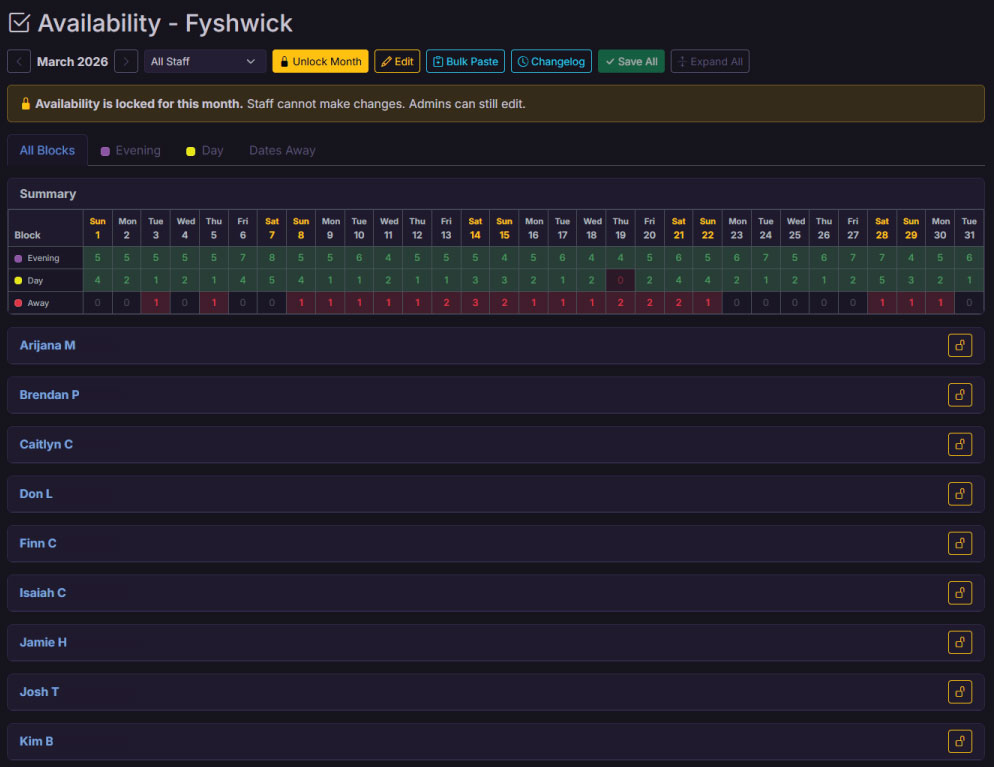
Staff submit their own availability through the portal. Admins can lock months, manage dates away, and view everything at a glance.

Staff submit availability via the portal. Per-month and per-staff locking. Bulk paste import from spreadsheets. All Blocks and Per Block view modes with dates away tracking.

Sessions & Scheduling

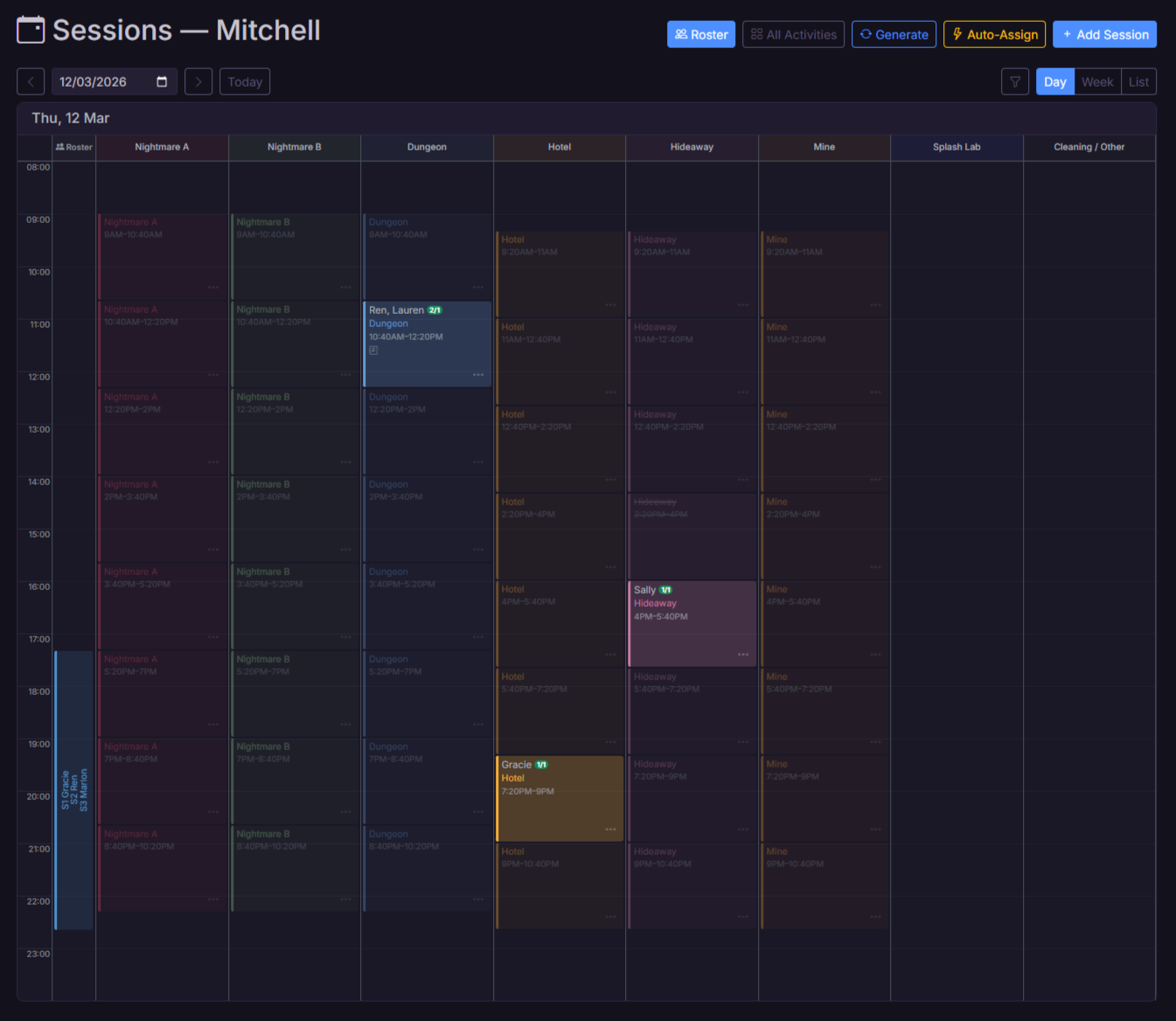
Schedule activity sessions throughout the day, assign staff, and see everything on a visual timeline. Perfect for bookings-based businesses.

Visual timeline with activity-type or resource columns. Define activity schedules with multi-slot days, staffing ratios, and phases. Bulk-generate sessions from templates. Staff picker with training and availability checks.

Resources

Map out your physical spaces — rooms, lanes, courts — and see what's happening in each one at any time.

Resource groups and individual resources with activity-type requirements. Timeline switches between activity and resource column modes. Auto-setup from existing activities for quick 1:1 mapping.

Kiosk Clock-In

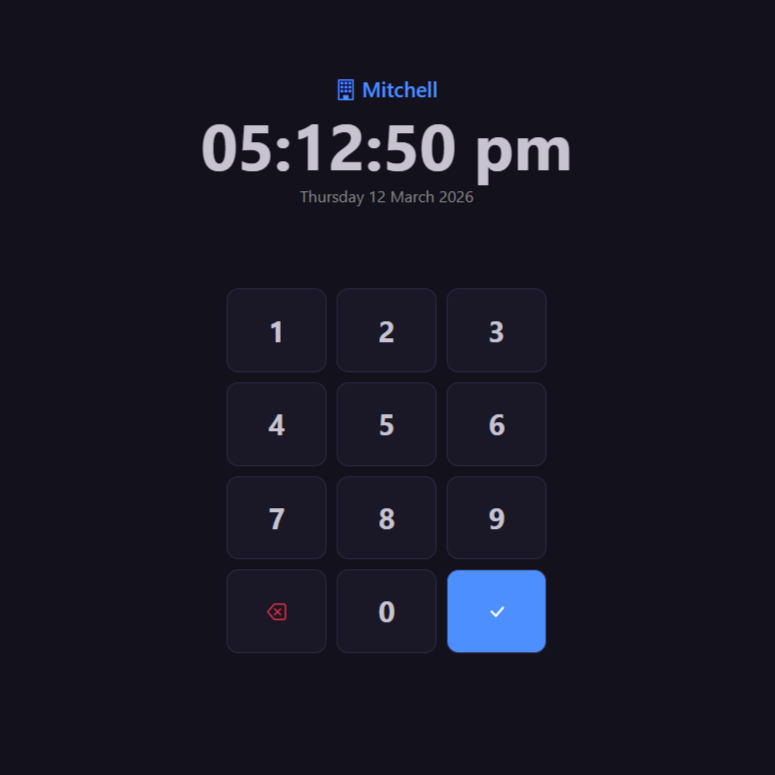
Set up a kiosk for staff to clock in and out with a PIN. Track hours and spot late starts at a glance.

Standalone kiosk page for clock-in/out via PIN. Auto-closes stale entries, snaps to payable time boundaries, and flags late clock-outs for review. Cross-location auto-handoff.

Booking

Front-Desk Booking Kiosk

A dedicated screen for the front desk: today's sessions and bookings at a glance, walk-ins added in seconds, payment links texted to customers.

PIN-secured booking kiosk on any tablet: day timeline with booking tiles, flags and alerts, walk-in and phone bookings, request confirmation, payment requests by text or email, and per-device permission control.

Timesheets

View and manage staff hours with payable time tracking, adjustments for over/underpay, reimbursements, easy exports, and a simple approval workflow.

Full timesheet management with actual vs payable time toggle. Hour and dollar adjustments, reimbursement tracking, position-split entries, pay period locking with paid status. Staff totals, CSV export, cost view with pay rate calculations, and time correction requests from staff.

Pay & Wages

Calculate staff pay automatically based on hours worked, with support for penalty rates, casual loading, and super.

Configurable base rates, penalty multipliers (weekend, public holiday, evening, late night), casual loading, superannuation, training wages, and age-based junior rates. Per-location overrides. Adjustment timesheets for over/underpay corrections.

Staff Portal

Self-service portal for staff: view roster and sessions, submit availability, request swaps, claim shifts, and check performance reviews and rewards.

Multi-tab portal with dashboard, roster, sessions timeline, shifts, availability, clock history, tasks, performance reviews, and rewards. Claim open slots, request time corrections, appeal review ratings, acknowledge notices, and manage PINs.

Shift Swaps & Claims

Staff post shifts for cover, others claim them. Mark slots as open so staff can volunteer. Optional admin approval keeps you in control.

Full swap lifecycle: post, claim, approve/deny. Claimable roster slots and sessions with multi-claim support. Training and conflict checks built in. Configurable approval requirements.

Multi-Venue

Manage multiple locations from one account. Staff see all their shifts across venues in one place.

Multi-location management with shared staff. Cross-venue conflict detection prevents double-booking. Per-venue kiosk, Slack, and pay configuration.

Announcements

Post announcements to your team and track who's read them. Scope to a single venue or send to everyone.

Location-scoped or org-wide announcements with read tracking. Expiry dates for auto-cleanup. Staff see unread announcements on their dashboard.

Export & Print

Download or print your roster in seconds. Three layout options for different needs.

Export by block, by day, or by staff. Print-optimised layouts and CSV downloads. Position icons included in exports.

Integrations

Square for payments, Slack for notifications, Xero for payroll — and if you're on Bookeo today, AutoRoster syncs with it so you can switch to native bookings whenever you're ready.

Square: payments, wallets and subscriptions. Slack: per-venue bot with DM notifications for shifts, sessions, swaps, rewards, notices, and reviews. Bookeo: real-time webhook sync for bookings, resources, and session auto-creation — run both side-by-side, then cut over to native bookings risk-free. Xero: OAuth 2.0 payroll push with earnings rate mapping and employee import. All individually toggleable.

Pro

Performance Reviews

Create review templates, rate staff on custom criteria, publish results, and track improvement over time. Staff can view scores and flag ratings for appeal.

Template builder with sections, elements, descriptions, and custom rating labels (0-5). Conduct reviews per staff with notes, save as draft or publish. Comparison view with colour-coded deltas. Staff can appeal individual ratings with admin response workflow. Comments thread per review.

Pro

Rewards & Recognition

Award points across custom categories — for great work, reviews, short notice shifts, or anything you want to recognise. Staff see their totals and a leaderboard.

Custom reward categories with icons and colours. Preset actions with point values for one-click awarding. Award from staff page, session picker, or dedicated rewards page. Leaderboard, activity feed, and staff portal dashboard card. Optional Slack DM on award.

Pro

Staff Notices

Issue formal commendations, warnings, or general notices to staff. Track acknowledgements and handle appeals — all with a full audit trail.

Notice templates with configurable severity levels and field prompts. Commendation, warning, and general notice types. Staff acknowledge or appeal via the portal. Admin resolves appeals with written responses. Slack DM on issue. Full audit log integration.

Pro

Training Modules

Build multi-session training checklists with discussed/performed tracking. Trainers work through items during shadow shifts, admins sign off on completion.

Create reusable training templates with sections and checklist items. Assign to staff with optional trainer and due date. Multi-pass session tracking — each shadow shift is a column. Discussed (D) and Performed (P) states with points-based progress. Trainers select which session they're working, previous sessions stay read-only. Bulk assign to new hires. Expiry and recertification support. Staff portal shows progress, admin signs off completion.

Audit Trail

Every action is logged with a plain-English description — who did what, when, and to whom. Searchable and filterable.

Human-readable audit descriptions on all entries. Session context with activity names, times, dates. Staff name resolution. Retroactive description generation for historical entries. Search across action, user, details, and description fields.
Built for how you work

No two venues run the same way — take bookings, roster your team, or run the whole pipeline. AutoRoster adapts to your workflow.

The Escape Room

Appointment-based venue
"Customers book and pay on our own website — vouchers, promo codes, Apple Pay, the lot. Every booking lands straight on the calendar, and rostering the right person takes one click because the system already knows who's trained and available. Confirmations and reminders go out automatically, and the reminder even sells add-ons and a discounted second room. What used to be three systems and a lot of copy-paste is just... one thing."
How it works
  • Booking pages on your website take payment upfront
  • Bookings become sessions, ready to staff with training & availability checks
  • Branded confirmations and reminders send themselves, with upsell offers
  • Staff see sessions in the portal, clock in at the kiosk, hours flow to pay

The Cafe

Regular shifts, variable demand
"We run the same shift times every day, but weekends and holidays need more staff. I set up our shift blocks with different staff counts for peak and off-peak days, collect everyone's availability through the portal, and hit Generate. The AutoRoster balances hours across the team so no one gets stuck with all the quiet shifts or all the busy ones. What used to take me an hour now takes seconds."
How it works
  • Define shift blocks with times and staff counts
  • Mark peak days on the calendar for extra coverage
  • Staff submit availability, then generate a balanced roster in one click
  • The points system keeps shifts distributed fairly

The Axe Throwing Bar

Uneven demand, fair shifts
"Mondays and Tuesdays are quiet, but we still need staff on. Before AutoRoster the same people kept getting stuck with those shifts. Now quiet days are worth fewer points and busy Friday and Saturday nights are worth more. The roster balances out automatically so everyone does their share of slow shifts. Plus with the kiosk and timesheets, staff clock in and out and I can export everything straight to payroll."
How it works
  • Shift blocks carry point values — quiet shifts earn fewer, busy shifts more
  • The roster algorithm factors points into its fairness calculations
  • Staff clock in at the kiosk; timesheets export to CSV for payroll

The Games Venue

Multi-room activity centre
"We run multiple game rooms at once, each hosting different activities throughout the day. On the timeline, each room shows up as its own column so I can see exactly what's happening where. When I add a session to a room it only offers the activities that can run there. I always know which staff are running which sessions, in which room, and for how long."
How it works
  • Create resource groups for rooms, then link activities to their rooms
  • The sessions timeline shows each room as a column
  • Add sessions to a room — only its activities appear
  • Assign trained staff and track the whole day

The Trampoline Park

Large casual team, training zones
"We've got more than 30 casual staff and lots of them are uni students who come and go. Getting everyone set up used to take forever. Now I just add their email and they instantly get a portal login. I mark which zones they're trained in — dodgeball, foam pit, ninja course — and the roster won't put anyone somewhere they're not qualified to work."
How it works
  • Add staff by email — they get a portal login automatically
  • Mark which staff are trained for each activity or zone
  • The roster engine only assigns staff where they're qualified

The Event Crew

Flexible gig-style workforce
"We don't run fixed rosters. Work comes in and we need people to put their hands up. I post shifts as claimable and my crew get a Slack notification straight away. They jump into the portal, claim what suits them, and I approve it. No group texts, no phone calls, no chasing people at 7am."
How it works
  • Post shifts or sessions as claimable instead of rostering them
  • Staff see them in the portal and get notified
  • Multiple staff can claim — you decide who gets it
  • Notifications keep everyone in the loop automatically

The Restaurant Group

Multiple venues, shared staff
"We run three restaurants and a lot of staff work across more than one location. Before AutoRoster we had to message other managers before rostering someone to make sure they weren't already working elsewhere. Now everything's in one system — if someone is rostered at the city venue, they simply won't appear available at the suburbs venue."

"Staff also love the All Venues view in the portal. One login, one calendar, every shift across every location."
How it works
  • Add multiple venues under one account, staff assigned per location
  • The roster engine catches cross-location clashes automatically
  • Staff see one calendar with every shift across every venue

Plans & Pricing

Start with rostering, start with bookings — or run the whole venue. No per-staff fees, no booking commissions.

Free

Play around, no card required
$0/mo
free forever
  • 3 staff · 1 location
  • 50 booked bookings/mo
  • Rostering & booking basics
  • Staff portal & kiosk
  • Payroll preview (no exports/Xero)
Coming soon

Roster Core

Rosters that build themselves
$39/mo
billed monthly
  • Up to 20 staff, 1 location
  • Roster generation & sessions
  • Timesheets, pay & wages
  • Staff portal & kiosk clock-in
  • Availability, swaps & claims
  • Mobile app & push notifications
Start Free Trial

Booking Core

Everything you need to take bookings
$39/mo
billed monthly
  • 1 location · 150 bookings/mo
  • Booking pages & website widget
  • Card, Apple Pay & Google Pay
  • Gift vouchers & promo codes
  • Confirmations & reminders
  • No commissions or customer fees
Start Free Trial

Roster Pro

Grow and develop your team
$69/mo
billed monthly
  • Up to 40 staff, 3 locations
  • Everything in Roster Core
  • Performance reviews & notices
  • Rewards & leaderboards
  • Training modules & quizzes
  • Xero payroll export
Start Free Trial

Booking Pro

Your brand, front desk & back office
$89/mo
billed monthly
  • 2 locations · 600 bookings/mo
  • Everything in Booking Core
  • Branded emails & designer
  • Multiple brands per account
  • Front-desk booking kiosk
  • Invoices, splits & add-ons
Start Free Trial
Best value

Venue Max

Get more, pay less
$139/mo
billed monthly
Roster Pro + Booking Pro
  • 80 staff · 4 locations · 4 brands
  • 2,000 bookings/mo included
  • Bookings flow straight into staffing
  • Post-booking upsell emails
  • Second-experience deals
  • Campaigns & conversion tracking
  • Priority support
Start Free Trial

All prices AUD. Paid plans include a 14-day free trial — no credit card required. Cancel anytime.
Bigger operation? Unlimited everything, onboarding and custom integrations — talk to us about Enterprise.

Frequently asked questions

Everything you need to know about AutoRoster.

How does it work?
Set up your shift blocks, let staff submit their availability, then generate a roster with one click. Staff can view shifts, request swaps, and manage availability through their own portal. Optional admin approval keeps you in control.
How does fair rostering work?
AutoRoster uses a customisable point system to distribute shifts evenly. Each shift type has a point value, and the algorithm prioritises staff with fewer accumulated points. You can adjust multipliers per staff member to fine-tune the balance.
What's the difference between roster shifts and sessions?
Roster shifts are regular repeating blocks (e.g. Morning, Evening) auto-generated based on availability. Sessions are individual bookable activities on a timeline (e.g. Escape Room at 2pm, Bowling at 4pm). Use one or both depending on how your business operates.
Can I manage multiple venues?
Yes. Handle multiple venues from a single account, share staff across them, and everyone sees all their shifts in one place. Cross-venue conflict checking prevents double-booking.
How many staff can I add?
Roster Core includes up to 20 staff at 1 location. Roster Pro includes up to 40 staff across 3 locations, and Venue Max up to 80 staff across 4 locations. Enterprise plans support unlimited staff and locations. All plans include unlimited admin accounts with no per-user fees.
What does it cost?
A Free plan is coming soon — 3 staff, 1 location, 50 booked bookings a month, with a payroll preview (exports and Xero need a paid plan). Start on either side: Roster Core ($39/mo AUD) covers rostering, timesheets and pay; Booking Core ($39/mo) takes bookings and payments on your own website with no commissions. The Pro tiers ($69 and $89/mo) add the staff development suite and Xero, or branded emails, the booking kiosk and invoicing. Venue Max ($139/mo) bundles everything — cheaper than running Roster Pro and Booking Pro separately. Pay yearly and get 2 months free. Enterprise pricing available for larger operations. No per-staff fees, no booking commissions.
Does it handle pay calculations?
Yes. Set base hourly rates, penalty multipliers for weekends and holidays, casual loading, and superannuation. View cost breakdowns alongside timesheets and export everything for payroll.
Why AutoRoster?
Built to solve our own rostering headaches, now shared with the world. AutoRoster is lightweight, affordable, and purpose-built for shift-based workplaces like escape rooms, activity centres, cafes, and hospitality venues. From rostering and timesheets to performance reviews, training, and payroll — it's everything you need in one place, without the complexity or cost of enterprise tools.
I have a feature request
We'd love to hear it. You can submit feature requests and vote on ideas through the in-app roadmap, or get in touch via the contact form below. We continuously improve based on real user feedback.

Get in touch

Questions? We'd love to hear from you.

Ready to automate your rostering?

Set up in minutes. Full access for 14 days — no credit card required.

Start Free Trial